Received an email with a docx attachment and finding it difficult to view/edit it since you don't have the latest MS Word 2007 in your desktop? No probs. With the latest update, Zoho Writer allows you to import docx documents. Import the document into your Zoho Writer account and you can view it online using your browser.
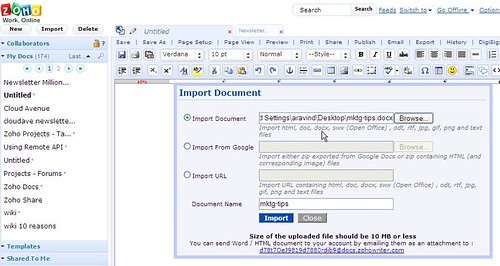
Note that the docx email attachment you received is now on the cloud. You can view and make changes to the document where ever you are, from any computer. And you can either share this document to the intended recipients or export it back as a docx file & send it as an email attachment (for the old-timers who still insist that you send the document as an attachment).
You can now import and export the below document formats in Zoho Writer.
Import : html, doc, docx, sxw, odt, rtf and txt
Export : html, doc, docx, sxw, odt, rtf, pdf, LaTeX and txt

Zoho- the online office suite - had a response . They launched import functionalatity for Docx for their Writer app. So no more annoying
Zoho- the online office suite - had a response . They launched import functionalatity for Docx for their Writer app. So no more annoying
Do anyone know how to "email-in" .docx email attachment into zoho writer? I found we can only "email-in" .doc email attachment into zoho writer, why?
Do anyone know how to "email-in" .docx email attachment into zoho writer? I found we can only "email-in" .doc email attachment into zoho writer, why?
[...] doesn’t yet support importing Open XML files, but you can use online services like Zamzar, Zoho Writer or software like OpenOffice 3.0, Microsoft Office 2007 or Microsoft Office Compatibility Pack to [...]
[...] doesn’t yet support importing Open XML files, but you can use online services like Zamzar, Zoho Writer or software like OpenOffice 3.0, Microsoft Office 2007 or Microsoft Office Compatibility Pack to [...]
[...] doesn’t yet support importing Open XML files, but you can use online services like Zamzar, Zoho Writer or software like OpenOffice 3.0, Microsoft Office 2007 or Microsoft Office Compatibility Pack to [...]
[...] doesn’t yet support importing Open XML files, but you can use online services like Zamzar, Zoho Writer or software like OpenOffice 3.0, Microsoft Office 2007 or Microsoft Office Compatibility Pack to [...]
[...] Zoho- the online office suite - had a response . They launched import functionalatity for Docx for their Writer app. Â So no more annoying [...]
[...] Zoho- the online office suite - had a response . They launched import functionalatity for Docx for their Writer app. Â So no more annoying [...]
[...] Zoho- the online office suite - had a response . They launched import functionalatity for Docx for their Writer app. Â So no more annoying [...]
[...] Zoho- the online office suite - had a response . They launched import functionalatity for Docx for their Writer app. Â So no more annoying [...]
Is .docx format supported in the Remote API too?
Is .docx format supported in the Remote API too?
DM : Thanks!Roger : It should be available in around 6-8 weeks.rmmoore: Apologies. Can you email your Zoho user ID and a screenshot of your Zoho Writer screen to support at zohowriter dot com? May be it's some local issue with your browser and our support team should be able to help you in resolving this. Try from another browser (Firefox 2,3 and IE 7 are recommended) or another computer and see if you see the Zoho Writer toolbar properly.Powell : For importing .xls files, you can try Zoho Sheet (http://sheet.zoho.com " rel="nofollow">http://sheet.zoho.com). And for presentations (ppt, pps, odp etc), you can try Zoho Show (http://show.zoho.com " rel="nofollow">http://show.zoho.com). And a combined dashboard of all your files can be accessed at Zoho docs (http://docs.zoho.com " rel="nofollow">http://docs.zoho.com).
DM : Thanks!Roger : It should be available in around 6-8 weeks.rmmoore: Apologies. Can you email your Zoho user ID and a screenshot of your Zoho Writer screen to support at zohowriter dot com? May be it's some local issue with your browser and our support team should be able to help you in resolving this. Try from another browser (Firefox 2,3 and IE 7 are recommended) or another computer and see if you see the Zoho Writer toolbar properly.Powell : For importing .xls files, you can try Zoho Sheet (http://sheet.zoho.com " rel="nofollow">http://sheet.zoho.com). And for presentations (ppt, pps, odp etc), you can try Zoho Show (http://show.zoho.com " rel="nofollow">http://show.zoho.com). And a combined dashboard of all your files can be accessed at Zoho docs (http://docs.zoho.com " rel="nofollow">http://docs.zoho.com).
That is very good.Is that writer works for all doc versions?.what about .xls?
That is very good.Is that writer works for all doc versions?.what about .xls?
when will .XLSX (Excel 2007) handling be available at Zoho Sheet?
when will .XLSX (Excel 2007) handling be available at Zoho Sheet?
Hi Arvind..
Hope you can help me.
Just started using Zoho writer...BUT
The tabs don't show and the TOOLBAR doesn't show like in your screenshot above.
Please advise.
Hi Arvind..
Hope you can help me.
Just started using Zoho writer...BUT
The tabs don't show and the TOOLBAR doesn't show like in your screenshot above.
Please advise.
This is fantastic. I had the same exact issue. My friend sent me docs in 2007 format and I had trouble opening them,since I have MS 2003, but this would make it a snap to read.Excellent feature guys! Thanks!
This is fantastic. I had the same exact issue. My friend sent me docs in 2007 format and I had trouble opening them,since I have MS 2003, but this would make it a snap to read.Excellent feature guys! Thanks!