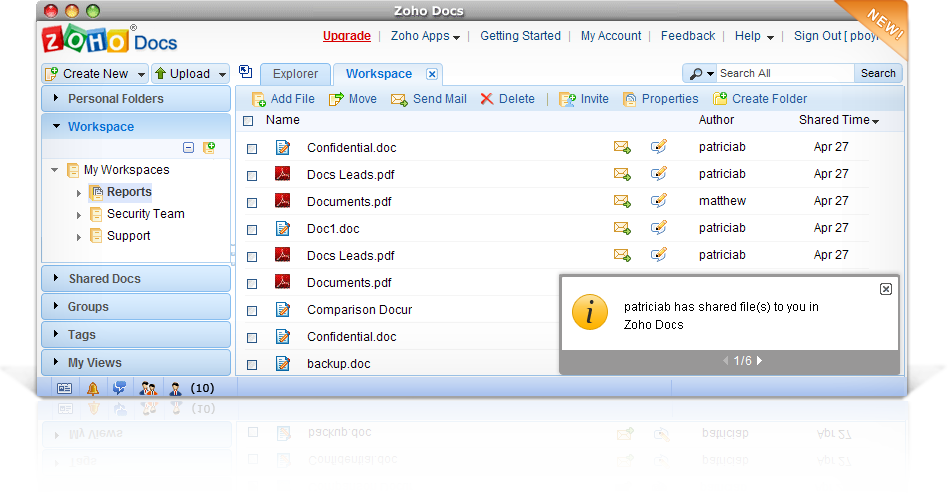
Let us look in detail at what is new in this update
Easy-to-use Navigation
The new navigation system is simple and intuitive. It focuses on things that users do most often like say, going to a specific folder, workspace or group.

Drag-and-Drop Files
Uploading files to Zoho Docs just got easier. You can now upload files by just dragging and dropping them from your desktop on to the desired folders in the “Personal Folders” section. You can also drag multiple files at once. There are no plugins needed for this feature to work. This new feature uses HTML5 and so will work in browsers that support HTML5, like Firefox 3.6+ and Chrome 6+.

Attach From Zoho Docs
We love listening to our customers and quite a number of you had told us that finding documents when using Zoho Mail’s
Attach from Zoho Docs
was not flexible enough. We have now provided more options to easily find and attach the documents from Zoho Docs.

Other Enhancements
- If you have documents shared to you, which are not relevant to you anymore, you can use the new Remove Share option to remove the sharing. An email notification will be sent to the author of the shared document.
- Using the Unsubscribe option, you now have control on what Workspaces you would want to view in your Workspace section.
- You can now email documents present in Workspaces using the Send Mail option.
Like Mark Ford who tweeted the below, we hope you too like the new look and feel of
Zoho Docs 🙂

Please do share your views and suggestions by dropping us a comment here.

I have a group. Not a work space. I am trying to share to that group because that is how we always did things. NOW, after this upgrade, group sharing seems to be off. From my acc, the one who created the group - everything shares okay. From the acc of my partner it does not.
Does not even give any mistake: files are just not there.Guys, whatever it is - please fix it.
@PatThanks for raising your concerns. We will provide Opera support and spell check as soon as possible.Regards
Sathish
Two comments on the recent upgrade to Zoho Docs:--I'm disappointed you still don't support the Opera
web browser.--Despite some features I like, I still won't use
Zoho Docs because there are still no suggestions for
misspelled words if you right-click (or control-click
on the Mac) on the misspelled word.In Firefox, misspelled words aren't even flagged.
(They're underlined in red in the Chrome browser.)This is a really basic feature that's been available
on every other word processor I've tested over the
last several years.Hope you can fix that soon, and port the app to Opera.All the best.Pat
great work zoho team!
Great improvements. Great application for which many thanks!
Great article!! Thanks for the Zoho Doc Update!
These are small improvements but big steps towards
a great user experience! Thank you Zoho Docs Team!
@akornilov,Thank you for your kind words and valuable suggestions.We have added 1 & 2 suggestions in our feature's list and will provide it ASAP.Regarding 3 Suggestion: You can directly download the document in desired format. To download the document, right-click on the document and select 'properties' in the displayed menu. A dialog with list of formats (for ex; .docs or .pdf) will be available to download.To upload files directly to folder/sub-folder in workspace: You can use the 'Bulk Upload' feature available in Zoho Docs.
Please visit the followin URL to know more,
http://www.zoho.com/online-document-management/online-bulkupload.html
And one more: it's still not possible to upload a file directly into Workspace's folder.
I again have to upload it to the workspace, then go to that workspace, find and select files and then move them to particular folder.
Hi,Great improvement in Docs, thank you.
Some comments:
* when i compose a message in Zoho Mail and try to attach docs from Workspaces, it's not easy to understand that those docs are located in the Shared documents tab; why didn't you just add a Workspaces tab?* collaborators in workspaces still can't delete files; only workspace's owner can* neither workspace's owner nor collaborators can just download file (created in zoho); i have to open it a new windows (and wait while it's get opened), then click edit (and again wait a lot), then click file, then choose Export as; that's VERY annoyingThank you.