Now you can login to Zoho with your Google or Yahoo! accounts. Below the Zoho Sign-in section, you now have the option to login with your Google or Yahoo! accounts.
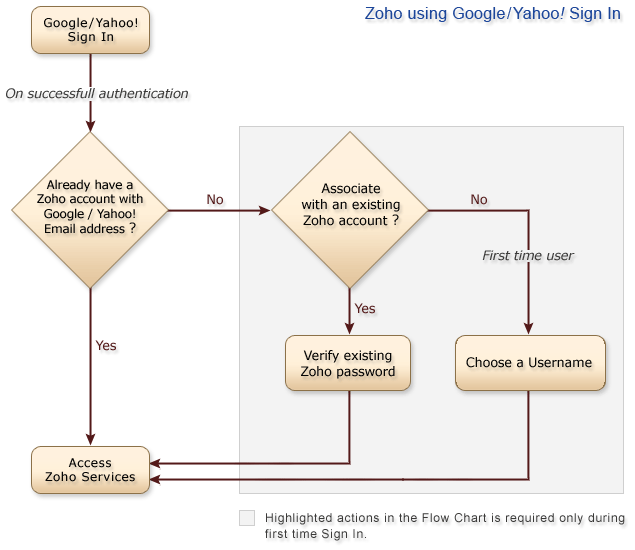
If you already have a Zoho account with your Google or Yahoo! email address, you will be logged in to the Zoho account automatically. If you do not have a Zoho account with your Google or Yahoo email address, then you have the option to either associate the Google or Yahoo email address with your existing Zoho account (under Accounts) or you can create a new one.
Apart from logging into Zoho with your existing accounts, you also have an option to import contacts from your Google and Yahoo! accounts to the Contacts section under Zoho Accounts.
This functionality is also useful for sharing documents. Now you can easily share your documents with your friends who have Google or Yahoo! accounts. They can login to Zoho with their Google or Yahoo! credentials and view shared documents without having to create new Zoho Account.
Here is a useful tip. Under http://accounts.zoho.com, if you add your Gmail and Yahoo email addresses (under 'My Email IDs' section) and confirm them, you'll be able to login to your Zoho Account with either your Zoho Account, Google Account or your Yahoo! Account.
Why this move?We obviously want many users to try out and use our applications. Apart from that, we noticed that when users try Zoho, they prefer our apps to competition. This Lifehacker poll conducted few months back for example gives you a snapshot.
There are two takeaways from the poll like the one above (and other polls we conducted).
- Many users don't prefer creating yet another account for yet another online app
- Users prefer Zoho to Competition when they try both (In case of the above poll, around 75% prefer Zoho)
We hope this little feature is useful. More than these polls, we want to hear from you if this is useful. Please do let us know your feedback.
Update: FAQs on this is available here. Also, this image gives you the flow.

I used Zoho for trial, and its really great. Currently I am using vTiger, and we may transfer to zoho any time, as this is best and easy to use.
I used Zoho for trial, and its really great. Currently I am using vTiger, and we may transfer to zoho any time, as this is best and easy to use.
Love the article. But still don't think many will try to log in via yahoo. Yahoo is dying.
Love the article. But still don't think many will try to log in via yahoo. Yahoo is dying.
@ bulgarovo, the procedure you have followed is correct.8. How do I link my existing Zoho account to Google/ Google Apps/ Yahoo! account? @
https://zohosso.wiki.zoho.com/...If you get 'email ID already exists' means, that particular email is linked with some other Zoho Account. You can release the email address or close that account from https://accounts.zoho.com
@ bulgarovo, the procedure you have followed is correct.8. How do I link my existing Zoho account to Google/ Google Apps/ Yahoo! account? @
https://zohosso.wiki.zoho.com/...If you get 'email ID already exists' means, that particular email is linked with some other Zoho Account. You can release the email address or close that account from https://accounts.zoho.com
I have a simple question:If you already have a Zoho account with your Google or Yahoo! email address, you will be logged in to the Zoho account automatically. If you do not have a Zoho account with your Google or Yahoo email address, then you have the option to either associate the Google or Yahoo email address with your existing Zoho account (under Accounts) or you can create a new one.How do you really do this? I can't seem to find how to associate with a GMAIL email.Moreover, when trying to change primary email to a gmail.com one, I get 'email ID already exists'
I have a simple question:If you already have a Zoho account with your Google or Yahoo! email address, you will be logged in to the Zoho account automatically. If you do not have a Zoho account with your Google or Yahoo email address, then you have the option to either associate the Google or Yahoo email address with your existing Zoho account (under Accounts) or you can create a new one.How do you really do this? I can't seem to find how to associate with a GMAIL email.Moreover, when trying to change primary email to a gmail.com one, I get 'email ID already exists'
login to Zoho with my yahoo
login to Zoho with my yahoo
just to open account
just to open account
i love features like this! good to see zoho updating and enhancing.
Zoho is one of the best offerings on the web. What’s interesting is that Google could really use Zoho and vice versa. Zoho will never scale to a Salesforce unless a *brand* acquires it- Google, Microsoft, Oracle(NetSuite), SAP. OK, maybe not SAP:)
i love features like this! good to see zoho updating and enhancing.
Zoho is one of the best offerings on the web. What’s interesting is that Google could really use Zoho and vice versa. Zoho will never scale to a Salesforce unless a *brand* acquires it- Google, Microsoft, Oracle(NetSuite), SAP. OK, maybe not SAP:)
[...] may through Microsoft’s Live authentication scheme in as well to include more people. I know Zoho and others use both Yahoo & Google together, mixed with their own authentication scheme. [...]
[...] may through Microsoft’s Live authentication scheme in as well to include more people. I know Zoho and others use both Yahoo & Google together, mixed with their own authentication scheme. [...]
[...] or Yahoo! ... single sign-on across Zoho &ampamp that should work with Google/Yahoo accounts. ...http://blogs.zoho.com/general/login-t... sign-in service google apps Content at ZDNet UKNews Articles, Whitepapers, Downloads, Opinion and [...]
[...] or Yahoo! ... single sign-on across Zoho &ampamp that should work with Google/Yahoo accounts. ...http://blogs.zoho.com/general/login-t... sign-in service google apps Content at ZDNet UKNews Articles, Whitepapers, Downloads, Opinion and [...]
Zoho Writer : Import from Google Docs & Equation Editor (LaTeX) support...Today’s Zoho Writer update introduces three key functionalitiesImport Documents from Google Docs to Zoho Writer
Equation Editor
LaTeX Export1. Import Documents from Google Docs to Zoho WriterAfter we accepted Google and Yahoo! sign-in to Zo...
Zoho Writer : Import from Google Docs & Equation Editor (LaTeX) support...Today’s Zoho Writer update introduces three key functionalitiesImport Documents from Google Docs to Zoho Writer
Equation Editor
LaTeX Export1. Import Documents from Google Docs to Zoho WriterAfter we accepted Google and Yahoo! sign-in to Zo...
[...] най-големите провайдъри на онлайн офиÑни приложениÑ, Ñъобщиха че вÑичките им апликации вече Ñа доÑтъпни и за [...]
[...] най-големите провайдъри на онлайн офиÑни приложениÑ, Ñъобщиха че вÑичките им апликации вече Ñа доÑтъпни и за [...]
+1 on using OpenID. Once you have OpenID enabled, you can easily accept logins from lots of providers, not just Yahoo and Google. Further, with solutions like the ID Selector (www.idselector.com), an OpenID login widget, site visitors can log in for the first time with just their account name, and return visits are single click logins (no text entry required).
+1 on using OpenID. Once you have OpenID enabled, you can easily accept logins from lots of providers, not just Yahoo and Google. Further, with solutions like the ID Selector (www.idselector.com), an OpenID login widget, site visitors can log in for the first time with just their account name, and return visits are single click logins (no text entry required).